
A math alarm clock is an alarm that won't turn off with a single tap: to silence it, you have to solve one or more math problems. It sounds simple, but it targets the real problem behind so many mornings: switching off the alarm half asleep and drifting back off without even noticing.
In this guide we explain why solving a problem wakes you up, when it works and when it doesn't, how to set it up step by step and which tricks make you genuinely get up on the first ring.
Quick answer: what it is and who it's for
It's a mission alarm: instead of a “stop” or “snooze” button, the alarm shows you a math problem and keeps ringing until you solve it. There are apps that do only this, and alarm apps with several missions, including a math one.
- It's for you if you turn off your alarm in your sleep, don't even remember doing it, or need to “switch on” your brain before making decisions.
- It's not enough on its own if your problem is falling back asleep after turning it off: you can solve a sum lying down. In that case, pair it with keeping your phone away from the bed, or choose a mission that puts you on your feet.
In LevoUp, the Math problem mission asks you to solve random equations, the alarm has no snooze button and, if you ignore it, it rings again.
Why solving a math problem wakes you up
When you wake up you go through sleep inertia: a groggy period when you think more slowly, react worse and struggle to make decisions. A 2019 review in Nature and Science of Sleep (Hilditch and McHill) describes it as typically lasting from a few minutes to more than half an hour, depending on how much and how you slept.
The snooze button is designed for an awake brain, but the one pressing it is half asleep. A math problem changes that in two ways:
- You can't do it on autopilot. You have to read, calculate and type the answer. That small effort of attention pulls you out of “turn it off and keep sleeping” mode.
- It buys time. While you solve it, a few seconds or minutes pass with your eyes open and the screen on, and sleep inertia starts to fade.
That's why the math mission is one of the most effective against the “I turned it off and don't remember” problem. What it doesn't do on its own is get you out of bed: that depends on where your phone is and what you do right after.

Want to stop hitting snooze starting tomorrow?
LevoUp won't turn off until you complete a mission. Try it free for 3 days.
Does it really work? Pros and limits
Let's be honest: no mission is magic. Here's what to expect from math compared with missions that make you move:
| Mission | Wakes your mind | Makes you get up | Best for |
|---|---|---|---|
| Math problem | Yes | Not necessarily | People who turn the alarm off in their sleep |
| Affirmation (typing a sentence) | Yes | Not necessarily | Starting the day with intention |
| Photo of the sky / Touch grass | Yes | Yes | People who fall back asleep; you also get natural light |
| Make your bed | Yes | Yes | People who need to get out of bed no matter what |
Pros: no setup needed, works anywhere (traveling, at someone else's place, at night with no light) and impossible to complete while asleep.
Limits: if your phone is on your nightstand, you can solve the problem, put the phone down and close your eyes again. The fix isn't a harder problem — it's removing the option to stay lying down. We show you how below.
How to set up the math mission in LevoUp, step by step
It takes less than a minute:
- Open LevoUp and create a new alarm (or edit one you already have).
- Pick the time you'll really get up, not the “optimistic” one.
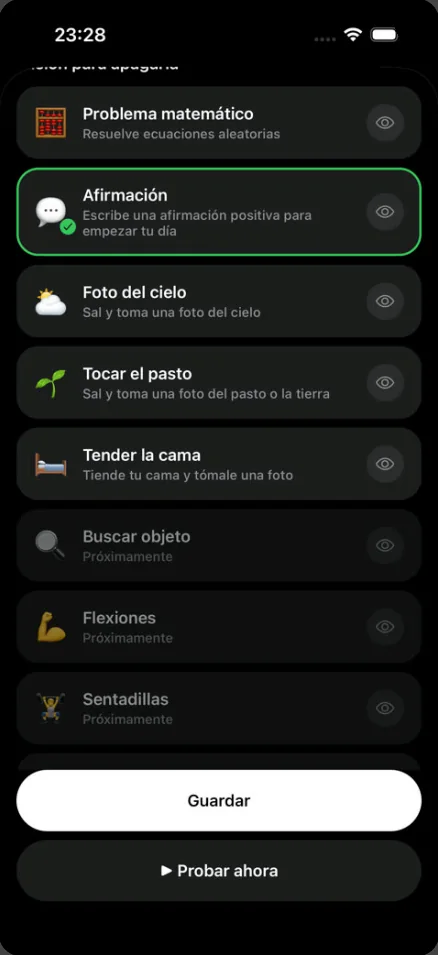
- In the mission list, tap Math problem (“Solve random equations”). The eye icon shows you an example of each mission before you choose it.
- Use Try now to test it tonight and know exactly what's waiting for you.
- Choose the days of the week and save.
In the morning, when it rings, the screen gives you only one way out: your mission button. No snooze, no stop.
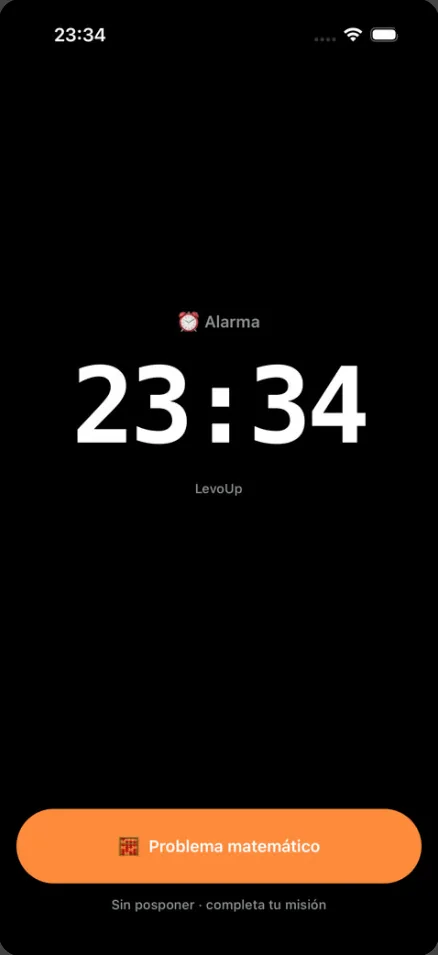
If you leave it ringing and do nothing, it rings again and again until you complete the mission.
7 tricks so the math mission actually gets you up
1. Keep your phone away from the bed
This is the trick that turns a mental mission into a physical one: to solve the problem, you first have to get up and grab your phone. Across the room or, even better, outside the bedroom.
2. Do something physical right after
When you finish the problem, don't go back to bed: open the curtains, switch on the light or walk to the kitchen for a glass of water. Light and movement help reduce sleep inertia.
3. One alarm, at your real time
Five backup alarms teach your brain that the first one doesn't count. With a single mission alarm the message is clear: when it rings, it means it. More ideas in our guide how to stop hitting snooze.
4. Get enough sleep
No math problem makes up for five hours of sleep. Most adults need 7 to 9 hours. Work out when to go to bed so you wake up at the end of a sleep cycle:
What time should you go to bed?Find out when to go to bed or wake up based on your 90-minute sleep cycles. Open calculator5. On tough days, switch to a photo mission
If you know tomorrow will be hard, change the mission to Photo of the sky or Make your bed: you can't do them lying down. We cover this in an alarm that won't turn off until you get up.
6. Have a reason to get up
Solving the problem wakes you up; knowing why you're getting up keeps you on your feet. Write it in “My reason” in LevoUp and you'll see it when you need it most.
7. Count your mornings
LevoUp's streaks and badges turn getting up on the first ring into a little game. The rest days you choose don't break your streak.
What to look for in a math alarm app
There are plenty of options: apps built only around math alarms and fuller mission apps such as Alarmy, which also includes a math mission (see our comparison LevoUp vs. Alarmy). Before you choose, check these points:
- No snooze button, or a way to turn it off. If you can skip the mission, it loses its point.
- It rings again if you ignore it. An alarm that gives up on its own is no use for heavy sleepers.
- Other missions are available. Math wakes your mind; for days when you have to get up no matter what, it helps to have photo missions.
- You can test it first. Doing the mission once at night avoids surprises in the morning.
- Clear pricing. LevoUp offers a 3-day free trial, then a yearly plan (about US$37 per year) or a weekly one (about US$9 per week); the exact price shows in the App Store for your country.
If you use an iPhone, we compare more options in our guide to the best alarm app for iPhone.
When it's not about the alarm
If you sleep 7 to 9 hours on a regular schedule and still find it extremely hard to wake up, feel very sleepy during the day, snore loudly or someone notices pauses in your breathing while you sleep, it's worth talking to a doctor: these can be signs of a sleep disorder that no app will fix.
For most people, though, the problem is simpler: turning off the alarm before they're actually awake. And that's where a math problem at 6 a.m. works wonders.
Frequently asked questions
What is a math alarm clock?
It's an alarm that, instead of turning off with a button, asks you to solve a math problem. It keeps ringing until you get the answer right, so you can't switch it off in your sleep.
Does a math alarm really help you wake up?
Yes, for waking your mind: solving a problem takes attention and pulls you out of sleep inertia. But you can do it lying down, so to avoid falling back asleep keep your phone away from the bed or use a mission that makes you get up.
Which alarm app has math problems?
There are apps dedicated only to math alarms and apps with several missions. LevoUp includes the Math problem mission, along with Affirmation, Photo of the sky, Touch grass and Make your bed, and it has no snooze button.
What happens if I don't solve the problem?
In LevoUp the alarm won't turn off until you complete the mission. If you ignore it, it rings again and again.
Is the math mission or the photo mission better?
It depends on your problem. If you turn off the alarm without noticing, math is usually enough. If you turn it off awake but fall back asleep, a photo mission like Photo of the sky or Make your bed works better, because you have to stand up.