
If you keep sleeping through your alarm, it almost always comes down to one of these: you’re not getting enough sleep, the alarm catches you in deep sleep, your phone is set to ring quieter than you think, or you turn it off half asleep and don’t remember. The fix is usually a mix of sleeping more, checking your phone’s volume and Focus settings, and using an alarm you can’t turn off without fully waking up.
In this guide we go through each cause, how to tell which one is yours and what to do tonight to wake up on the first ring.
Quick answer: what to do tonight
- Run a volume test with your phone locked to check how loud the alarm really is.
- Check your phone’s settings: the “Ringtone and Alerts” volume, Focus modes (Do Not Disturb, Sleep) and Scheduled Summary.
- Put your phone away from the bed, on a hard surface and uncovered.
- Pick a sound you don’t associate with sleep and that stands out from background noise (a fan, the AC).
- Use an alarm with a mission so you can’t turn it off in your sleep.
- Go to bed earlier: not getting enough sleep is the most common reason people sleep through alarms.
If none of this works and you’re also very tired during the day, read the last section on when to see a doctor.
Why you sleep through your alarm: the most common causes
“I’m just a heavy sleeper” is the explanation most of us reach for, but there’s usually something more specific behind it:
- Sleep debt. When you sleep too little several nights in a row, your brain tries to catch up and your sleep gets deeper. The more tired you are, the harder it is for a sound to wake you. The American Academy of Sleep Medicine (AASM) recommends that adults sleep 7 or more hours per night.
- Deep sleep. In deep sleep (stage N3) it takes a stronger stimulus to wake you. If the alarm goes off right in that stage, it’s easier to miss it or wake up very groggy.
- Sleep inertia. In the first minutes after waking, you think slowly and act almost on autopilot. Many people who “don’t hear” the alarm actually hear it, turn it off and don’t remember.
- Phone settings. Low volume, Focus modes, grouped notifications or a phone under the pillow make the alarm much quieter than you imagine.
- An out-of-sync schedule. If you go to bed very late, your internal clock is still in “night mode” when the alarm rings.
- Alcohol and some medications. Drinking in the evening and certain drowsiness-causing medications can make it harder to wake up. If you take medication, ask your doctor or pharmacist about its effects.

Want to stop hitting snooze starting tomorrow?
LevoUp won't turn off until you complete a mission. Try it free for 3 days.
Are you not hearing it, or turning it off without noticing?
It’s worth finding out, because the fix is different. Try this for two or three mornings:
- Check your alarm app’s history or log: did it stop after a few seconds or ring until the end?
- Ask whoever sleeps with you or nearby whether they heard it and saw you turn it off.
- Record audio with another device around your alarm time.
If the alarm rings until the end and doesn’t wake you, the problem is volume, sound or lack of sleep. If you turn it off without remembering, the problem is that turning it off is too easy: your half-asleep self shuts it down before you’re really awake. In that case you need turning it off to take a conscious effort, as we explain below.
Make sure your alarm is actually loud
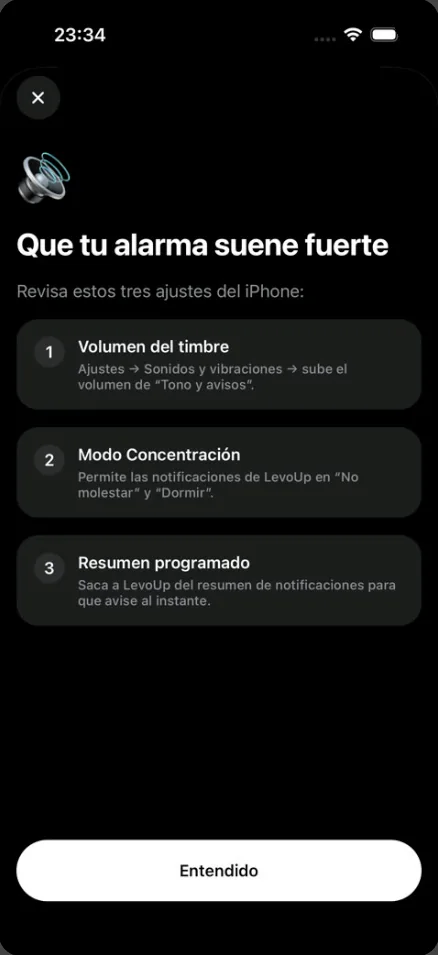
On iPhone, the alarm volume isn’t the media volume you change with the buttons while watching videos: it follows the “Ringtone and Alerts” volume or, since iOS 27, the alarm volume if you’ve split it from the ringtone. Check these three settings:
- Ringer and alarm volume: Settings → Sounds & Haptics → raise the “Ringtone and Alerts” volume (and, on iOS 27, the alarm volume if you’ve split it).
- Focus: if you use Do Not Disturb or Sleep and your alarm comes from an app, allow its notifications in those modes.
- Scheduled Summary: take your alarm app out of the notification summary so it alerts you right away.
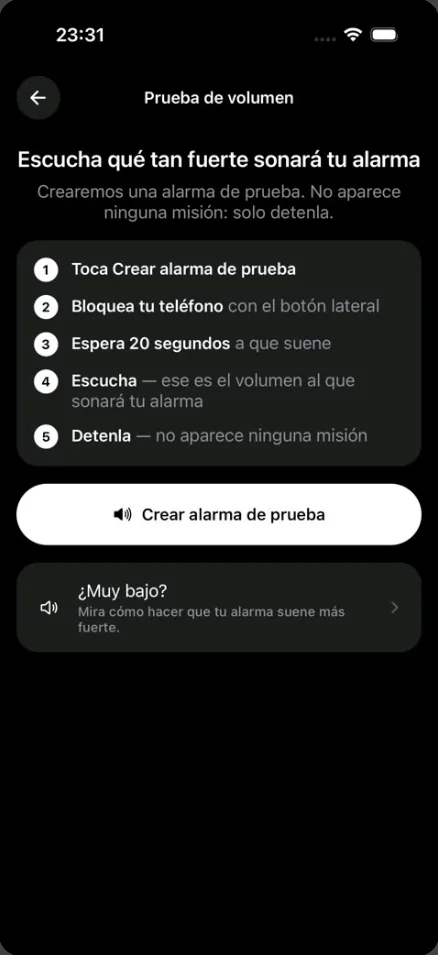
Then do a real test: lock your phone, put it where it sits at night and listen to how it sounds from bed. LevoUp has a volume test in its settings that creates a test alarm in 20 seconds, with no mission, so you hear exactly how it will sound in the morning; if it seems too quiet, the app shows you these three settings.
If you want to know how an app differs from the built-in alarm, see our comparison of the iPhone alarm vs. an alarm app.
Pick a sound that wakes you up (and put the phone in the right place)
If you’ve used the same tone for months, your brain may have turned it into background noise. Switching sounds helps, as does choosing one that contrasts with what’s already playing in your room: if you sleep with a fan or AC on, a low, steady tone blends into that hum, while a higher or more rhythmic one stands out.
Louder isn’t always better for how you feel afterwards. A study from RMIT University in Melbourne, published in PLOS ONE in 2020, found that people who woke up to melodic alarms reported less grogginess than those who used harsh tones. Try a few: what matters is that it wakes you up and doesn’t leave you in a bad mood.
Placement matters too:
- Don’t put your phone under the pillow or face down on something soft: the sound gets muffled.
- Leave it on a hard surface, away from the bed: it sounds louder and forces you to get up to reach it.
- If you wear headphones or earbuds to sleep, check how your alarm behaves when they’re connected.
Make it impossible to turn off asleep: mission alarms
If your problem is turning the alarm off without noticing, more volume won’t cut it. You need turning it off to require being awake. That’s what an alarm that won’t turn off until you get up is for: instead of a button, it asks you to complete a task.
LevoUp has no snooze button, and the alarm keeps ringing until you complete the mission you chose when you set it. Right now you can choose Math problem, Affirmation, Photo of the sky, Touch grass and Make your bed; push-ups, squats and find an object are coming soon.
- Math problem: forces your brain to get going; hard to solve on autopilot.
- Photo of the sky or Touch grass: make you get up and move, and the outdoor light helps you shake off sleep faster.
- Make your bed: once it’s made, getting back in feels much less tempting.
When you pick the sound for each alarm you can also preview it first (Classic, Digital, Bells, Sunrise, Radar, Doorbell, Birds, Marimba…) and keep the one that works best for you.
Get enough sleep: the real fix
No trick makes up for sleeping 5 hours. If you struggle to hear your alarm every morning, your body is most likely asking for more sleep. Count back from your wake-up time: if you need to be up at 7:00 am and want 7.5 hours of sleep, you should be in bed by about 11:15 pm.
Thinking in sleep cycles of about 90 minutes also helps you avoid waking up in the middle of deep sleep. Work out when to go to bed based on your alarm:
What time should you go to bed?Find out when to go to bed or wake up based on your 90-minute sleep cycles. Open calculatorCycles vary from person to person, so use it as a guide. Keeping a similar schedule every day, weekends included, helps your body start waking up on its own close to alarm time. If you want to shift your schedule earlier, follow our plan for how to wake up early.
More tips for heavy sleepers
- Let the light in. A slightly open curtain or a light that turns on at wake-up time helps your body come out of sleep before the alarm rings.
- Add vibration. A smartwatch or band that vibrates on your wrist is a good extra help, especially for people with hearing loss.
- Skip alcohol before bed. Even if it helps you fall asleep, it worsens sleep quality.
- One alarm, not ten. Setting lots of backup alarms teaches your brain to ignore them. Better one you can’t turn off without waking up. If you also tend to snooze, see how to stop hitting snooze.
- Get up as soon as you turn it off. Standing up, drinking water and opening the window reduce sleep inertia.
When to see a doctor
Being a deep sleeper is normal. But see a doctor if you sleep 7–9 hours on a regular schedule and still don’t wake up, if you’re very sleepy during the day, if you snore loudly or someone has seen you stop breathing while asleep, or if you notice you hear worse than before. Problems like sleep apnea, other sleep disorders or hearing loss won’t be solved by an alarm, and they can be treated.
Frequently asked questions
Why do I sleep through my alarm?
The most common causes are sleeping less than you need, the alarm going off during deep sleep, a phone volume or Focus setting that makes it quieter than you think, and turning it off half asleep without remembering. Alcohol, some medications and certain sleep disorders can also play a role.
Is it normal to not wake up to your alarm?
It happens to a lot of people now and then, especially after several nights of short sleep. If it happens often even though you sleep 7–9 hours, or you’re very sleepy during the day, it’s worth talking to a doctor.
How do I make my iPhone alarm louder?
Go to Settings, Sounds & Haptics, and raise the Ringtone and Alerts volume; on iOS 27, if you split off the alarm volume, raise that too. If your alarm comes from an app, allow its notifications in Do Not Disturb and Sleep and remove it from Scheduled Summary. Then test it with your phone locked.
What if I turn off my alarm in my sleep?
Use an alarm that can’t be turned off with a single tap. With a mission alarm, like solving a math problem or taking a photo of the sky, you have to be awake to turn it off. Keeping your phone away from the bed also helps.
What’s the best alarm sound for heavy sleepers?
One that stands out from the noise in your room and that you haven’t tuned out from hearing it too often. Change tones if you’ve used the same one for a long time. An RMIT study in PLOS ONE (2020) linked melodic alarms with less grogginess on waking than harsh tones.