
If you turn off your alarm in your sleep and don't even remember doing it, the fix isn't a louder alarm: it's an alarm that won't turn off until you're out of bed. They exist, and they work on a very simple idea: instead of an “off” button, they ask you to complete a task — a mission — that you can only do awake and, in many cases, on your feet.
In this guide we explain how these alarms work, what kinds of missions exist, which ones genuinely force you to get up and how to set one up step by step so you don't fall back asleep tomorrow.
Quick answer: which alarm won't turn off until you get up
What you're looking for is called a mission alarm (also a “challenge alarm” or “anti-snooze alarm”). These are alarm clock apps where the alarm keeps ringing until you complete a task. The ones that get you out of bed best ask for something you can't do lying down: taking a photo of a specific spot in your home or outside, for example.
- If you want to get up no matter what: choose a photo mission (the sky, grass, your made bed). You have to stand up and move to complete it.
- If the problem is turning off the alarm in your sleep: a mental mission, like a math problem or typing a sentence, is enough to wake your brain.
- If you'd rather have something without a screen: there are physical alarm clocks on wheels, like Clocky, that roll away and make you chase them.
In LevoUp, for example, the alarm has no snooze button: it only turns off when you complete your mission, and if you ignore it, it rings again and again.
How a mission alarm works
A regular alarm lets you decide at the worst possible moment. When you wake up you go through sleep inertia: for a few minutes you think more slowly, and the part of your brain responsible for self-control isn't fully online yet. One tap on “snooze” or “stop” is far too easy for a half-awake brain.
A mission alarm changes the rules in three ways:
- There's no off button. The only way to silence it is to complete the task you chose the night before.
- The task requires being awake. Solving a problem, typing a sentence or framing a photo takes attention, and that speeds up the shift from sleep to wakefulness.
- The decision is already made. You choose the mission with a clear head, before bed. In the morning you don't have to decide whether to get up — just keep the deal you made with yourself.
That's why these alarms work better than setting five alarms in a row or turning up the volume: they don't depend on your willpower at 6 a.m.

Want to stop hitting snooze starting tomorrow?
LevoUp won't turn off until you complete a mission. Try it free for 3 days.
Types of missions: which ones actually get you out of bed
Not every mission forces you to get up. Some wake your mind but can be done under the covers. This table sums up the most common ones in alarm apps:
| Mission type | Does it make you get up? | Best for |
|---|---|---|
| Math problem | Not necessarily | People who turn off the alarm asleep and need to “switch on” their brain |
| Typing a sentence or affirmation | Not necessarily | Waking your mind and starting the day with intention |
| Photo of a place (sky, grass, bed) | Yes | People who fall back asleep even after waking up |
| Scanning a QR code or barcode | Yes, if the code is far from the bed | Forcing you into another room |
| Walking a number of steps | Yes | Moving from the very first minute |
| Shaking the phone | No | A quick nudge, but easy to do lying down |
The rule of thumb: if your problem is falling back asleep after turning off the alarm, pick a mission that puts you on your feet. If your problem is turning it off without noticing, a mental mission may be enough. And you can always pair it with keeping your phone away from the bed.
LevoUp's missions, one by one
In LevoUp you choose your mission when you create each alarm. Five are available today:
- Math problem: you solve random equations. Wakes your mind in seconds.
- Affirmation: you type a positive affirmation to start the day. It makes you focus and type carefully.
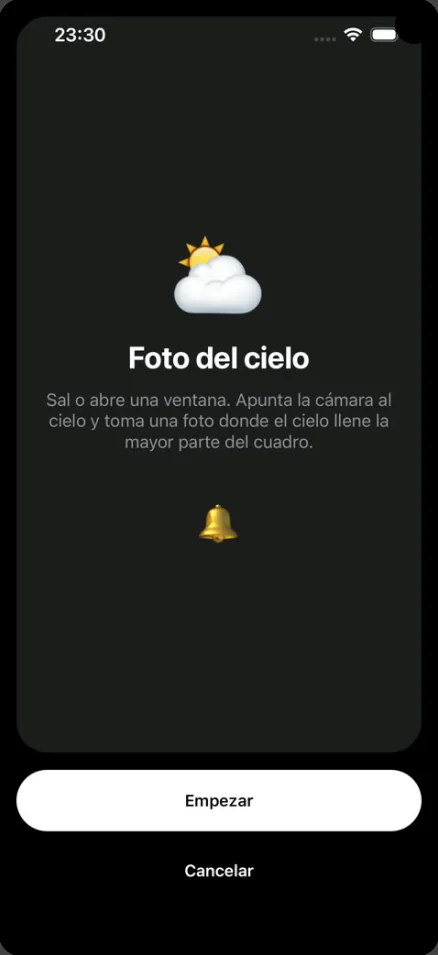
- Photo of the sky: you go outside or open a window and take a photo where the sky fills most of the frame.
- Touch grass: you go outside and take a photo of grass or soil.
- Make your bed: you make your bed and take a photo of it. Impossible without getting up.
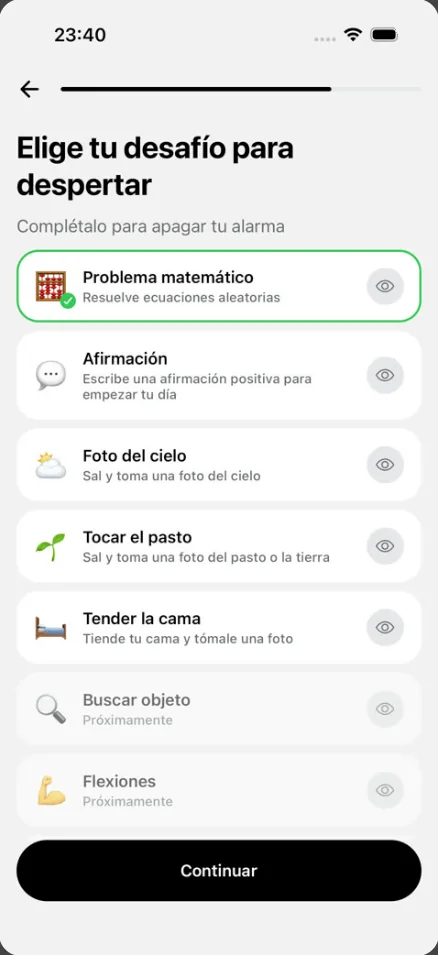
Photo missions are verified with AI in the installed app, so a random photo taken from your pillow won't count. And more missions are on the way: push-ups, squats and find an object appear in the app as “coming soon.”
How to set up your alarm so you don't fall back asleep
A mission alarm works best when you set it up well. Here's the step-by-step we recommend:
- Pick the time you'll really get up. No “just in case” buffer: there won't be a snooze, so set it for your real time.
- Pick the mission based on your problem. If you fall back asleep, Make your bed or Photo of the sky. If you turn it off asleep, Math problem or Affirmation.
- Pick the days. Turn on only the days you need to be up early; in LevoUp, the rest days you mark don't break your streak.
- Test the mission before bed. In the alarm editor you can use “Try now” to see how it works. Better to sort out any doubts at night than at 6 a.m.
- Make sure it's loud. Check your ringer volume and that no Focus mode silences the alarm. LevoUp includes a volume test in Settings.
- Charge your phone out of arm's reach. One extra step of distance means the mission starts with you already standing.
And don't forget the other half: getting enough sleep. If you go to bed late, any alarm turns into a fight. Work out when to go to bed so you wake at the end of a sleep cycle:
What time should you go to bed?Find out when to go to bed or wake up based on your 90-minute sleep cycles. Open calculatorPros and limits of alarms that won't turn off
They work very well for most people, but it's good to know what to expect:
Pros
- They kill the “5 more minutes.” No snooze button, no negotiation.
- They wake you up faster. Moving, concentrating and — with photo missions — getting natural light all reduce grogginess.
- They build a measurable habit. Seeing your streak of first-alarm mornings motivates you not to break it.
Limits
- They don't replace sleep. They get you out of bed, but if you sleep five hours you'll still be tired during the day.
- They need a little preparation. Photo missions need a specific spot (a window, outdoors, your bed), so think ahead, especially when traveling.
- They depend on your phone. If your phone runs out of battery or is muted, no app can ring. Charge it every night.
If you want to compare specific options, our guide to the best alarm app for iPhone reviews the alternatives, and LevoUp vs. Alarmy puts the two mission apps side by side.
Tips to make it work from week one
- One alarm only. If you set backups, your brain learns the first one doesn't count.
- Have a reason. Write down what you're getting up for: a workout, studying, a calm breakfast. In LevoUp you can save it in “My reason.”
- Light and movement after the mission. Don't go back to bed: open the curtains, drink some water, walk to the kitchen.
- Same schedule every day. Getting up at a fixed time helps your internal clock wake you before the alarm rings.
- Be patient the first week. The first few days can be hard; if you miss one, pick it back up the next.
For a full plan, read how to stop hitting snooze, and if you're wondering whether the snooze button is bad for you, we explain what science says about hitting snooze.
When the problem isn't the alarm
If you sleep 7 to 9 hours on a regular schedule and still find it extremely hard to wake up, or feel very sleepy during the day, something else may be going on: loud snoring, pauses in breathing while you sleep or sleep that never feels restful can be signs of a sleep disorder. In that case, see a doctor. An alarm helps you get up, but it's no substitute for a diagnosis.
Frequently asked questions
Is there an alarm that won't turn off until you get up?
Yes. They're called mission alarms: alarm clock apps with no off button that only go quiet when you complete a task, like photographing the sky, making your bed or solving a math problem. LevoUp works this way, and if you ignore it, it rings again and again.
Which mission is best for forcing you out of bed?
Photo missions of a specific place, like the sky or your made bed, because you can't complete them lying down. Mental missions, like math, wake your brain but can be done from bed.
Can you cheat a mission alarm?
It's much harder than with a regular alarm. In LevoUp, photo missions are verified with AI, so a random photo won't count. Still, what helps most is choosing the mission with a clear head the night before and keeping your phone away from the bed.
What happens if I ignore the alarm?
LevoUp has no snooze button: if you ignore the alarm, it rings again and again until you complete the mission you chose.
Are there physical alarm clocks that won't turn off until you get up?
Yes. There are alarm clocks on wheels, like Clocky, that roll around the room and make you get up to turn them off. The difference is that a mission app needs no extra device, and you can change the task every night.
Does a mission alarm work if I'm a very heavy sleeper?
It helps, because it forces you to wake up fully to turn it off, but first make sure the volume is high and no silent mode blocks it. If you still can't wake up despite getting enough sleep, see a doctor.