
The best alarm app for iPhone depends on why you struggle to get up. If you just need something to ring on time, the Clock alarm built into your iPhone is free and reliable. If the problem is that you turn it off half-asleep or hit snooze over and over, you want a mission alarm that won't stop until you do something, like LevoUp or Alarmy. And if you want to wake during light sleep, a smart alarm like Sleep Cycle.
In this guide we cover what a good iPhone alarm needs, what changed in iOS 26, compare the most popular options and show you how to set up your phone so the alarm always rings.
Quick answer: which app fits your situation
| If your problem is… | You want |
|---|---|
| You just need an alarm that rings, no extras | The iPhone Clock alarm (free) |
| You turn off the alarm half-asleep or snooze endlessly | A mission alarm: LevoUp or Alarmy |
| You want lots of different missions and don't mind ads | Alarmy (free version with ads) |
| You want a simple alarm with no ads and no snooze button | LevoUp |
| You wake up groggy and want to wake during light sleep | A smart alarm like Sleep Cycle |
| You need to wake someone else or coordinate with family | Galarm (group alarms) |
You don't need several. What usually works best is one alarm, set to your real wake-up time, in an app that matches your specific problem.
What a good iPhone alarm app should have
Before looking at names, it helps to know what separates a good alarm from one that leaves you asleep. These are the criteria we use:
- It always rings. That's the bare minimum. It has to ring with the iPhone locked, on silent or with a Focus mode on. We explain what to check below.
- It's hard to turn off while asleep. If one tap does it, your half-awake brain will switch it off without you remembering. Missions (solving a problem, taking a photo, typing a sentence) force you to actually wake up.
- It doesn't invite snoozing. A big, easy snooze button is a habit trap. Ideally you can remove it, or it doesn't exist.
- Clear pricing and no annoying ads. Many apps are free with ads and charge for the useful features. Check the free trial and what it costs afterwards.
- Privacy. If the app uses the camera in your bedroom, check what it does with the photos and what its “App Privacy” labels in the App Store say.
- Simplicity at 6 a.m. The fewer steps to create and change an alarm, the better.
Want to stop hitting snooze starting tomorrow?
LevoUp won't turn off until you complete a mission. Try it free for 3 days.
Is the iPhone alarm enough? What changed in iOS 26
The iPhone Clock app is the simplest option: free, ad-free, integrated with the Sleep schedule in the Health app and with Apple Watch. For many people it's enough.
With iOS 26, Apple made two important changes:
- Custom snooze length: you can finally choose anywhere from 1 to 15 minutes instead of the fixed 9 minutes. It's set inside each alarm under “Snooze Duration.”
- Slide to stop (iOS 26.1): turning off the alarm now takes a swipe instead of a button tap, which cuts down on accidental dismissals. If you prefer the old button, you can bring it back in Settings > Accessibility > Touch > “Prefer Single-Touch Actions.”
Still, the limitation remains: a one-second gesture turns the alarm off, and you can do it without fully waking up. If that sounds like you, or if you snooze three or four times every morning, the Clock alarm alone won't change the habit. That's where mission apps come in.
Another iOS 26 change that affects you even if you don't see it: Apple introduced AlarmKit, a framework that lets third-party apps ring like system alarms — full screen, and even with silent mode or a Focus on. Not every app uses it yet, so it's still important to test your alarm before relying on it.
The best iPhone alarm apps, by type
LevoUp: to stop hitting snooze
LevoUp is a mission alarm built for one thing: getting you up the first time. There's no snooze button; if you ignore the alarm, it rings again and again until you complete your mission. You can choose a math problem, an affirmation, a photo of the sky, touch grass or make your bed (push-ups, squats and find an object are coming soon). Photo missions need no setup and verification happens on your phone: photos are never uploaded.
It also counts your mornings with streaks and badges, lets you mark rest days that don't break your streak, and keeps your reason for getting up in “My reason.” There's no ad-supported free version: you can try it free for 3 days on the yearly plan (about US$37 per year) or go weekly.
Alarmy: the one with the most missions
Alarmy is the best-known mission alarm app. It has more variety than LevoUp: math, memory games, shaking your phone, walking, scanning a barcode, photographing a pre-registered object or typing phrases, plus sleep sounds and sleep tracking. It can be used free with ads; removing them and unlocking certain missions requires Premium. If you're torn between the two, we go deep in LevoUp vs. Alarmy.
Sleep Cycle: to wake during light sleep
Sleep Cycle analyzes your sleep using the microphone or accelerometer and wakes you during a light phase within a window before your alarm time (30 minutes by default, adjustable). It's useful if you tend to wake up very groggy, but it doesn't stop you from turning off the alarm and falling back asleep. It's free with in-app purchases, and features like sleep sounds or snore detection are part of Premium.
Galarm: for shared alarms
Galarm stands out for group and buddy alarms: you can set an alarm for someone else or coordinate the whole family, with chat and alarm history. It's free with a Premium plan, and other participants also need to install the app.
The Clock alarm: the bare-minimum option
Free and always there. Ideal if you wake up easily to any sound and just want your iPhone to ring on time — now with the snooze length of your choice.
iPhone alarm app comparison table
Details for the other apps checked against their App Store listings and reviews published in 2026. Prices vary by country: always confirm in the store before subscribing.
| App | How it turns off | Snooze | Price | Best for |
|---|---|---|---|---|
| iPhone Clock | Swipe (iOS 26.1) | Yes, 1 to 15 min | Free | People who wake up easily |
| LevoUp | By completing a mission | None | 3-day trial; about US$37/year | Quitting snooze |
| Alarmy | With the mission you set | Configurable | Free with ads; paid Premium | Maximum mission variety |
| Sleep Cycle | No mission | Yes | Free; paid Premium | Waking in light sleep |
| Galarm | No mission | Depends on settings | Free; paid Premium | Group alarms |
How to set up your iPhone so the alarm always rings
The best app is useless if it doesn't ring. On iPhone, check these settings before the first night, especially with third-party apps:
- Ringer volume: in Settings > Sounds & Haptics, turn up “Ringtone and Alerts.” Many alarms use that volume, not the media volume.
- Focus mode: if you use “Do Not Disturb” or “Sleep,” add your alarm app to the allowed apps.
- Scheduled Summary: if it's on, take the alarm app out of the summary so it notifies you instantly.
- Do a real test: set an alarm for one minute from now, lock the phone and listen to how it rings.
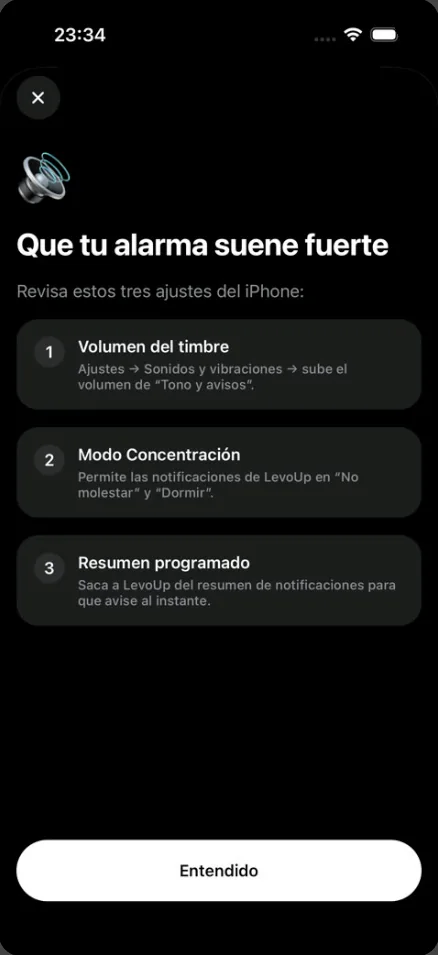
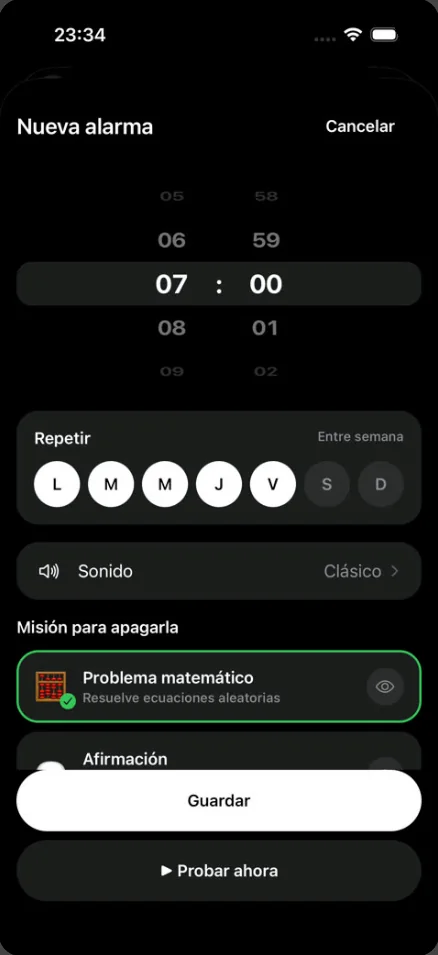
LevoUp also has a Volume test in Settings: it creates a test alarm that rings after 20 seconds with your phone locked, so you can check the real volume before bed.
Beyond the app: get enough sleep
No alarm makes up for too little sleep. If you go to bed late, any app will be a battle every morning. Most adults need 7 to 9 hours, and it's easier to get up at the end of a sleep cycle than in the middle of one. Work out when to go to bed:
What time should you go to bed?Find out when to go to bed or wake up based on your 90-minute sleep cycles. Open calculatorPair whichever app you choose with three simple habits: one alarm at your real wake-up time, your phone away from the bed and the same schedule every day. We cover it step by step in how to stop hitting snooze.
And if you sleep enough and still find it extremely hard to wake up, snore loudly or feel very sleepy during the day, talk to a doctor: there may be a sleep disorder behind it.
Frequently asked questions
What's the best alarm app for iPhone?
It depends on your problem. If you just need it to ring, the Clock alarm is free and reliable. If you snooze or turn it off half-asleep, a mission alarm like LevoUp or Alarmy works better. If you wake up groggy, a smart alarm like Sleep Cycle.
Is there an iPhone alarm that won't turn off until you get up?
Yes. Mission alarms only turn off when you complete a task. In LevoUp you can choose a math problem, affirmation, photo of the sky, touch grass or make your bed, and there's no snooze button.
Can you remove the snooze button on iPhone?
Yes. In the Clock app, open the alarm and turn off “Snooze.” Since iOS 26 you can also change the snooze length from 1 to 15 minutes.
Do alarm apps ring when the iPhone is on silent?
The Clock alarm always rings. Third-party apps depend on how they're built and on your settings, so check the Ringtone and Alerts volume, allow the app in your Focus modes and test it with the phone locked.
Are there free alarm apps for iPhone?
Yes. The Clock alarm is free, and apps like Alarmy, Sleep Cycle and Galarm have free versions with limited features or ads. LevoUp has no free version, but you can try it free for 3 days.