
If your iPhone alarm isn’t going off, the usual culprits are a very low “Ringtone and Alerts” volume, an alarm sound set to “None” (so it only vibrates), audio being sent to Bluetooth headphones or a speaker, or a one-off iOS glitch that leaves the alarm silent. In almost every case you can fix it in two minutes from Settings and the Clock app.
This guide gives you a quick check to do tonight, each cause explained with its fix, a symptom table to diagnose the problem and a backup plan so you’re not late in the meantime.
Quick 2-minute check
- Raise the right volume: Settings → Sounds & Haptics → drag the “Ringtone and Alerts” slider (on iOS 27, the separate alarms and timers slider).
- Check the alarm sound: Clock app → Alarms → Edit → tap the alarm → Sound. If it says “None”, it will only vibrate.
- Turn off Bluetooth or check which headphones or speakers your iPhone stays connected to overnight.
- Turn off Attention Aware Features if the alarm gets quieter when you look at your phone: Settings → Face ID & Passcode → Attention Aware Features.
- Restart your iPhone and update iOS if the alarm shows on screen but makes no sound.
- Run a real test: set an alarm for 2 minutes from now, lock the phone and leave it where it sits while you sleep.
If it still fails after that, the less obvious causes and what to do about each one are below.
1. Alarm volume isn’t the same as video volume
This is the most common mix-up. The side buttons change media volume while you watch a video or listen to music, but the Clock alarm uses the “Ringtone and Alerts” volume. You can have media at full blast and the alarm almost silent.
According to Apple Support, to adjust it:
- Open Settings → Sounds & Haptics.
- Drag the “Ringtone and Alerts” slider to the right.
- If you turn on “Change with Buttons”, the volume buttons will also change this volume. Handy, but careful: if you lower it by accident during the day, your alarm will be quieter in the morning. If that keeps happening, leave it off.
Up to iOS 26, that single slider controlled your ringtone, alerts and alarms, so turning down the ringer to avoid calls also turned down your alarm. With iOS 27, Apple split the volumes and gave alarms and timers their own slider. If you’re already on iOS 27, that’s the one to check.
Want to stop hitting snooze starting tomorrow?
LevoUp won't turn off until you complete a mission. Try it free for 3 days.
2. Alarm only vibrates: the sound is set to “None”
If you feel the vibration but hear nothing, check the sound for that specific alarm:
- Open the Clock app and go to the Alarms tab.
- Tap Edit, then the alarm that’s failing.
- Tap Sound and choose any tone other than “None”.
Each alarm stores its own sound, so if you have several, check them one by one. If you use StandBy (iPhone charging on its side), Apple notes that alarm haptics are disabled there: if the sound is also set to “None”, the alarm won’t do anything you’d notice.
If you’ve used the same tone for months, your brain may have learned to tune it out. Switching sounds helps; there are more ideas in our guide to sleeping through your alarm.
3. Sound is going to Bluetooth headphones or a speaker
If you sleep with AirPods, keep a Bluetooth speaker in the bedroom or your iPhone stays paired with the car in the garage, the audio can end up somewhere you don’t expect. Apple says the alarm plays at a set volume through the iPhone’s built-in speaker as well as connected wired and wireless headphones, but with one earbud in or lost in the pillow, it’s easy to miss.
- Before bed, open Control Center and check which device your iPhone is sending audio to.
- If you don’t need it, turn Bluetooth off at night.
- If you sleep with headphones, test the alarm with them in so you know how it sounds.
4. Volume drops when you look at your iPhone
On iPhones with Face ID, Attention Aware Features lower the volume of alarms and alerts when the phone detects you’re looking at it. If you grab your phone as soon as it starts ringing, the alarm becomes almost inaudible and it’s easier to drift back to sleep.
To turn them off: Settings → Face ID & Passcode → Attention Aware Features. In 2024, when many users reported alarms that appeared on screen without sounding, some said turning this setting off fixed it; Apple didn’t confirm that was the cause, but it’s an easy setting to try.
5. Silent mode, Do Not Disturb and alarm apps
According to Apple, the Ring/Silent switch or Action button, Silent mode and Do Not Disturb don’t affect Clock app alarms. So if your Clock alarm fails, the cause is elsewhere on this list.
Third-party alarm apps are different: they rely on notifications. To make sure they ring properly, check in Settings that:
- The app’s notifications are allowed, with sound on.
- The app is allowed to notify you in the Focus modes you use at night (Do Not Disturb, Sleep).
- The app isn’t included in your Scheduled Summary, which delays notifications.
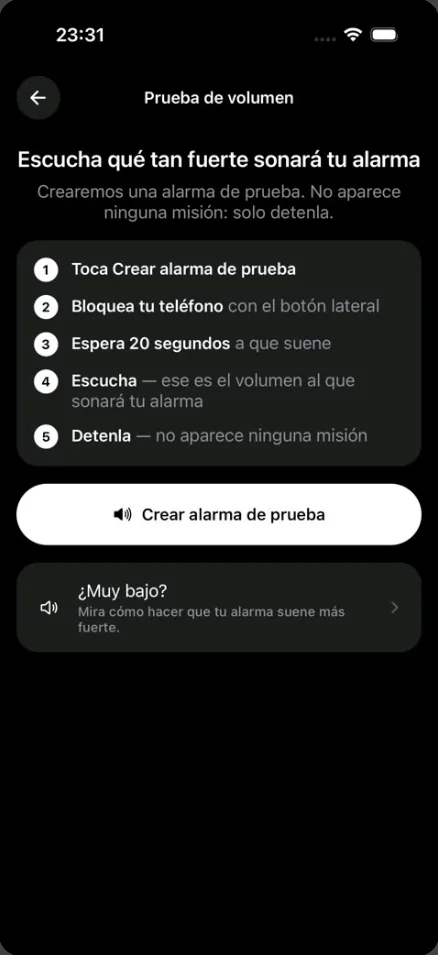
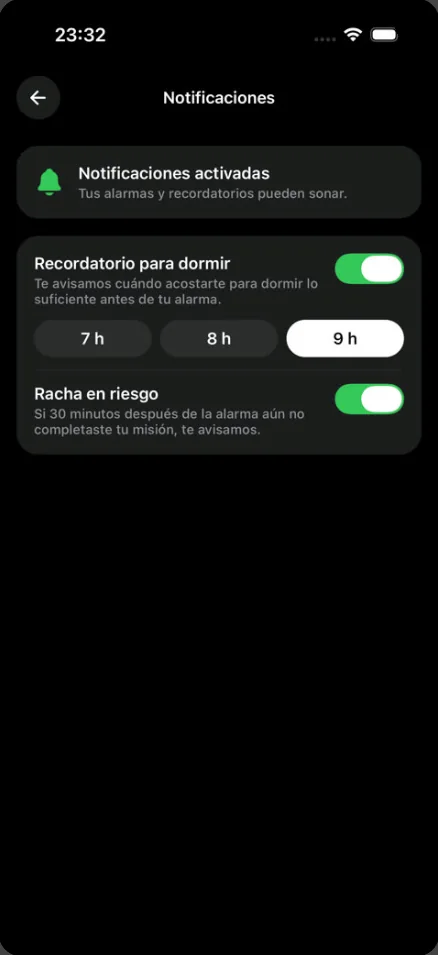
In LevoUp you can check this from inside the app: Settings → Notifications shows whether they’re on, and the volume test creates a test alarm that rings in 20 seconds, with no mission, so you hear exactly how it will sound with the phone locked. If it seems quiet, the app reminds you of the three iPhone settings worth checking.
6. iOS glitches: it shows on screen but stays silent
Sometimes the alarm appears on time but silently, or stops sounding after an update. These are software bugs Apple has fixed across different versions. Try these in order:
- Restart your iPhone. It clears many one-off audio glitches.
- Update iOS in Settings → General → Software Update.
- Delete the alarm and create it again instead of editing it.
- Don’t change the time manually. Apple advises against manually adjusting the date and time (for example, to speed up game timers) because it can affect alarms. Keep “Set Automatically” on in Settings → General → Date & Time.
- Check your Sleep Schedule alarm. If you use the Sleep Schedule in the Health app, its “Wake Up” alarm appears separately at the top of the Clock app’s Alarms list: make sure it’s on and has a sound.
- As a last step, Settings → General → Transfer or Reset iPhone → Reset → Reset All Settings. It doesn’t erase your photos or apps, but it does clear settings like saved Wi-Fi networks.
Diagnose by symptom
| What happens | Likely cause | What to do |
|---|---|---|
| Rings very quietly | Low “Ringtone and Alerts” or alarm volume | Raise it in Sounds & Haptics; consider turning off “Change with Buttons” |
| Only vibrates | Alarm sound set to “None” | Clock → Edit → Sound → pick a tone |
| Starts loud, gets quieter when you look | Face ID Attention Aware Features | Turn off Attention Aware Features |
| Nothing audible in the room | Audio sent to Bluetooth headphones or a speaker | Check Control Center or turn off Bluetooth |
| Shows on screen but silent | iOS glitch | Restart, update iOS, recreate the alarm |
| Alarm app doesn’t alert you | Notifications, Focus or Scheduled Summary | Allow notifications and remove it from the summary |
| Rings, but you turn it off asleep | Turning it off is too easy | Use a mission alarm |
Plan B: an alarm you can’t turn off half asleep
While you sort out the problem, it’s tempting to set five alarms in a row “just in case”. It works as a patch, but over time it trains your brain to ignore them; we explain why in is it bad to set multiple alarms?. It’s better to have one reliable main alarm that requires you to be awake to turn it off.
There’s another case that gets mistaken for “my alarm didn’t go off”: it rang, but you switched it off half asleep and don’t remember. If that’s you, a louder alarm isn’t enough. LevoUp has no snooze button, and the alarm keeps ringing until you complete the mission you picked: Math problem, Affirmation, Photo of the sky, Touch grass or Make your bed (push-ups, squats and find an object are coming soon). If you’re torn between an app and the built-in alarm, see our iPhone alarm vs. alarm app comparison or our pick of the best alarm app for iPhone.
And if your alarm rings fine but you still struggle to wake up, you may simply be short on sleep: work out what time to go to bed based on when you need to get up.
What time should you go to bed?Find out when to go to bed or wake up based on your 90-minute sleep cycles. Open calculatorWhen to contact Apple
If you’ve checked everything above, restarted and updated, and the alarm still doesn’t sound, or your iPhone has no sound for calls and videos either, there may be a problem with the speaker. In that case, contact Apple Support or visit an authorized service provider. It helps to note which alarm fails, how often and since when, for example since a specific update.
Frequently asked questions
Why is my iPhone alarm not going off?
The most common causes are a very low Ringtone and Alerts volume (or alarm volume on iOS 27), an alarm sound set to None, audio going to Bluetooth headphones or a speaker, Face ID Attention Aware Features lowering the volume when you look at the phone, and one-off iOS glitches that usually clear after a restart or update.
Does silent mode stop my iPhone alarm from ringing?
No. According to Apple, Silent mode and Do Not Disturb don’t affect the sound of Clock app alarms. What does affect it is the alarm volume and the sound you chose. Third-party alarm apps, however, depend on their notifications and Focus permissions.
Why does my iPhone alarm only vibrate?
Usually because that alarm’s sound is set to None. Open Clock, go to Alarms, tap Edit, choose the alarm and pick a tone under Sound. Check each alarm separately, since each one stores its own sound.
Why does my iPhone alarm get quieter on its own?
On iPhones with Face ID, Attention Aware Features lower the volume when they detect you’re looking at the screen. You can turn them off in Settings, Face ID & Passcode. It can also happen if Change with Buttons is on and you lower the volume by accident during the day.
Will my iPhone alarm go off with AirPods in?
Apple says the alarm plays through the iPhone’s built-in speaker as well as connected wired and wireless headphones. Even so, if you sleep with headphones, test it to see how you hear it, and turn off Bluetooth at night if you don’t need it.
What should I do if my iPhone alarm shows on screen but makes no sound?
Restart your iPhone, install the latest iOS update, and delete and recreate the alarm. If it keeps happening and your phone has no sound for calls or videos either, contact Apple Support, as it may be a speaker problem.