
Alarmy is probably the best-known mission alarm app: it's been in the stores for years and has a long feature list. But plenty of people look for an Alarmy alternative because the free version has ads, because the most useful missions are paid, or simply because they want something simpler at 6 a.m.
In this comparison we put LevoUp and Alarmy side by side — missions, price, ads, privacy and ease of use — and tell you honestly where each one wins. That way you can pick the one that actually gets you out of bed.
Quick answer: LevoUp or Alarmy?
If you want the widest possible range of missions and extras like sleep sounds or sleep tracking, Alarmy is the more complete option. If you'd rather have a simple, ad-free alarm with missions that get you out of bed and photos that never leave your phone, LevoUp is a good alternative.
- Choose Alarmy if you want shake-the-phone missions, memory games, chained missions or a sleep tracker in the same app.
- Choose LevoUp if you want something focused only on waking up: pick a mission, get up and add to your streak, with no menus or ads.
Both share the core idea: the alarm doesn't turn off with a tap — you have to do something to silence it. The difference is how much else you want the app to do.
Comparison table: LevoUp vs. Alarmy
Alarmy details checked against its App Store listing and reviews published in 2026. Prices vary by country and store, so always confirm the amount before subscribing.
| LevoUp | Alarmy | |
|---|---|---|
| Main idea | Alarm that only turns off when you complete a mission | Mission alarm + sleep features |
| Available missions | Math problem, affirmation, photo of the sky, touch grass, make your bed | Math, photo, shake, memory, squats, walking, QR/barcode scan, and more |
| Coming soon | Push-ups, squats, find an object | — |
| Snooze button | None | Configurable (“Anti-Snooze” feature) |
| Free version | No; 3-day free trial | Yes, with ads and limited features |
| Free trial | 3 days (yearly plan) | 7 days of Premium |
| Approximate price | About US$37 per year or US$9 per week | In the US, the yearly plan usually shows at US$59.99; varies by country |
| Ads | No | Yes, in the free version |
| Mission photos | Checked on your phone, never uploaded | Photo mission matches an image you register beforehand |
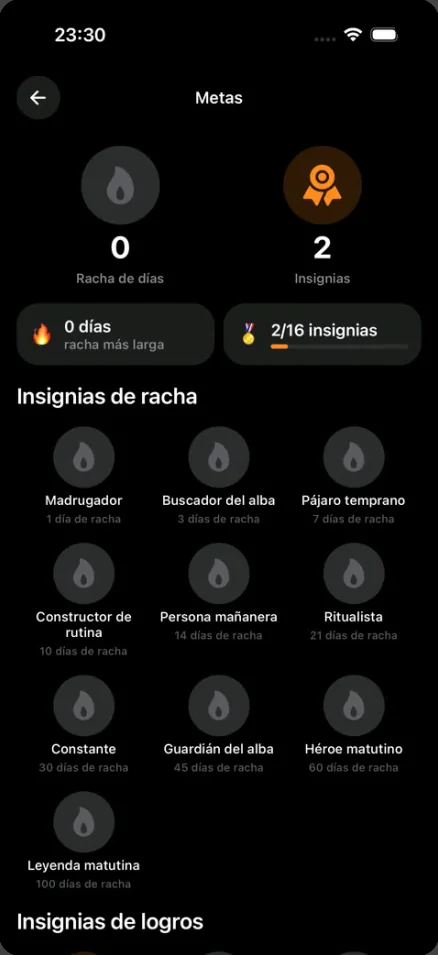
| Streaks and badges | Yes | Not highlighted in its store listing |
| Sleep sounds and tracking | Bedtime reminder | Relaxing sounds, sleep and snoring tracking |
| Platforms | iPhone and Android | iPhone and Android |
Want to stop hitting snooze starting tomorrow?
LevoUp won't turn off until you complete a mission. Try it free for 3 days.
Missions: variety vs. simplicity
Alarmy wins on numbers here. It offers more mission types than LevoUp: math problems, memory games, shaking your phone, squats, walking a set number of steps, scanning a barcode or photographing an object you registered earlier. Some of them, like walking or squats, and the option to combine several missions in one alarm, are part of Premium.
LevoUp has fewer missions, but each one is designed to get you out of bed and start your day with something concrete:
- Math problem: random equations that wake up your brain.
- Affirmation: you type a positive sentence to start with intention.
- Photo of the sky: you open the window or step outside and photograph the sky — which also gets you natural light.
- Touch grass: you go outside and photograph grass or soil. Literally.
- Make your bed: you make it and snap a photo; no crawling back in after that.
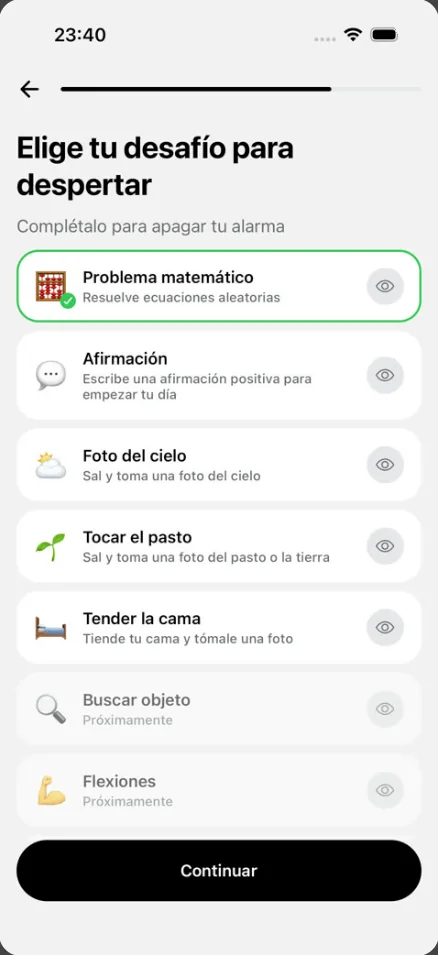
One practical difference: with Alarmy's photo mission you have to register a reference picture first (say, your sink or coffee maker). LevoUp's photo missions need no setup: you just point at the sky, the grass or your bed. Push-ups, squats and a find-an-object mission are coming soon.
Price and ads
This is one of the most common reasons people look for an Alarmy alternative.
Alarmy is free to download and has an unpaid version with unlimited alarms and some missions, but it includes ads. Removing them and unlocking every feature requires Premium, which comes with a 7-day free trial. On the US App Store, the yearly plan usually shows at US$59.99, and the listing shows several subscription tiers with prices that vary by country.
LevoUp has no ad-supported free version: everything is included in the subscription. You can try it free for 3 days on the yearly plan (about US$37 per year) or pick the weekly plan (about US$9 per week). The exact price in your currency appears in the App Store or Google Play before you confirm, and if you cancel during the trial you aren't charged.
If all you need is a basic math mission and ads don't bother you, Alarmy's free version may be enough. If you're going to pay anyway, compare both yearly prices in your store.
Privacy: what happens to your photos and data
A mission alarm with photo missions uses the camera right as you wake up, often in your bedroom. So it's worth checking what each app does with that data.
In LevoUp, the camera is only used during the mission and verification happens on your phone: we don't store, upload or share your photos.
For Alarmy, the privacy labels on its App Store listing (self-reported by the developer) say some data — such as location, identifiers and usage data — may be used to track you, and list purposes like third-party advertising and analytics. That's common for free, ad-supported apps, but it's good to know. You can check those labels yourself under “App Privacy” in the App Store before installing any alarm.
Ease of use at 6 a.m.
Alarmy is a big app: besides alarms it has sleep sounds, sleep tracking, widgets and lots of settings. If you like to fine-tune everything, that's a plus. If you just want to wake up, it can be too much.
LevoUp focuses on one thing. You create an alarm in a few steps — time, days, sound and mission — and when it rings there's no snooze button: if you ignore it, it rings again and again until you complete the mission. Afterwards you see your streak, your badges and, if you like, the reason you saved in “My reason” for getting up.
A few details that help day to day:
- Volume test in Settings, so you can check before bed that the alarm is loud.
- Rest days: pick the days with no alarm — they don't break your streak.
- Bedtime reminder: tells you when to go to bed to get 7, 8 or 9 hours.
- Five languages: Spanish, English, Portuguese, French and German.
To work out what time to go to bed so you wake up at the end of a sleep cycle, use the calculator:
What time should you go to bed?Find out when to go to bed or wake up based on your 90-minute sleep cycles. Open calculatorWhich one should you pick?
There's no universal winner; it depends on what you're after:
- Alarmy is better if you want lots of different missions (memory, shake, walking, QR codes), sleep features in the same app and a free version, even with ads.
- LevoUp is better if you want an alarm focused on getting up, with no ads, photo missions that need no setup, photos that never leave your phone and streaks that keep you from slipping.
Whichever app you choose, what works best is pairing it with good habits: one alarm at your real wake-up time, your phone away from the bed and a regular schedule. We walk through it step by step in our guide how to stop hitting snooze.
If you want to try the alternative, you can download LevoUp and use it free for 3 days.
Frequently asked questions
What's the best alternative to Alarmy?
It depends on what bothers you about Alarmy. If you want something simpler with no ads, LevoUp is an alternative focused on getting you up: the alarm only turns off when you complete a mission, like solving a math problem, photographing the sky or making your bed.
Is Alarmy free?
Alarmy can be used for free with ads and some missions. Features like certain missions, combining several missions or removing ads require the Premium subscription, which has a 7-day trial. The price varies by country.
Does LevoUp have a free version?
It doesn't have an ad-supported free version, but you can try it free for 3 days on the yearly plan. If you cancel before the trial ends, you aren't charged.
Does LevoUp have the same missions as Alarmy?
No. Alarmy has more mission types. LevoUp offers math problem, affirmation, photo of the sky, touch grass and make your bed; push-ups, squats and find an object are coming soon.
Can I snooze in LevoUp?
No. LevoUp has no snooze button: if you ignore the alarm, it rings again and again until you complete your mission.
Does LevoUp upload my photos?
No. The camera is only used during the mission and verification happens on your phone. Photos aren't stored, uploaded or shared.