

Erly (“Erly: Wake Up Early”) took off fast with a simple idea: the alarm won't turn off until you complete a mission — often a physical one — and every morning you nail adds to your streak. It's very well rated on the App Store, but plenty of people look for an Erly alternative because it's Apple-only, because it needs a subscription to be truly usable, or because they'd prefer different missions.
In this comparison we put LevoUp and Erly side by side — missions, streaks, price, privacy and platforms — and tell you honestly where each one wins, so you can pick the alarm that fits you best.
Quick answer: LevoUp or Erly?
Both apps share the essentials: there's no snooze button, and the alarm only stops once you do something to prove you're awake. The difference is in the type of mission, the platform and how each app keeps you motivated.
- Choose Erly if you're on iPhone and mainly want physical missions, like camera-verified push-ups, with a strict streak-and-commitment system.
- Choose LevoUp if you want an alarm that also works on Android, in five languages, with missions that get you out of bed without a workout (math problem, affirmation, photo of the sky, touch grass or make your bed), photos that never leave your phone, and rest days that don't break your streak.
If push-ups are exactly what you like about Erly, note that push-ups and squats aren't available in LevoUp yet — they're coming soon.
Comparison table: LevoUp vs. Erly
Erly details checked on November 12, 2026 against its US App Store listing and articles and reviews published about the app. Features and prices can change by country, so confirm them in the store before subscribing.
| LevoUp | Erly | |
|---|---|---|
| Main idea | Alarm that only turns off when you complete a mission | Alarm that only turns off when you complete a mission, built around streaks and daily commitment |
| Available missions | Math problem, affirmation, photo of the sky, touch grass, make your bed | Physical missions such as camera-verified push-ups, among others |
| Coming soon | Push-ups, squats, find an object | — |
| Snooze button | None | None (“No snoozes,” per its listing) |
| Streaks | Streak, badges and history | Current streak, best streak and daily wins |
| Days off | Rest days that don't break your streak | Goals lock 4 hours before your wake-up time |
| Free version | No; 3-day free trial | Free download, but the listing says a subscription is required for full access |
| Approximate price | About US$37 per year or US$9 per week | In-app purchases from US$6.99 to US$39.99 in the US (the listing doesn't say the billing period for each) |
| Platforms | iPhone and Android | iPhone (plus Apple-silicon Macs and Vision Pro); requires iOS 17.6 or later |
| Languages | English, Spanish, Portuguese, French and German | English and Spanish |
| Mission photos | Checked on your phone, never uploaded | The camera verifies your exercises |
Want to stop hitting snooze starting tomorrow?
LevoUp won't turn off until you complete a mission. Try it free for 3 days.
Missions: workout vs. morning routine
Erly's signature is physical missions. The app became known for making you do push-ups when you wake up, with the camera checking that you actually did them before the alarm stops. App Store reviews also mention other missions, such as searching for an item. If moving your body first thing motivates you, it's a strong approach.
LevoUp takes a different path: missions that make you get out of bed and do something useful to start the day, no pajama workout required:
- Math problem: random equations that switch your brain on. We cover it in detail in our math alarm clock guide.
- Affirmation: you type a positive sentence to start the day with intention.
- Photo of the sky: you open the window or step outside and snap the sky, which also gets you some morning daylight.
- Touch grass: you go out and take a photo of grass or soil.
- Make your bed: you make it and take a photo, which makes crawling back in a lot harder.
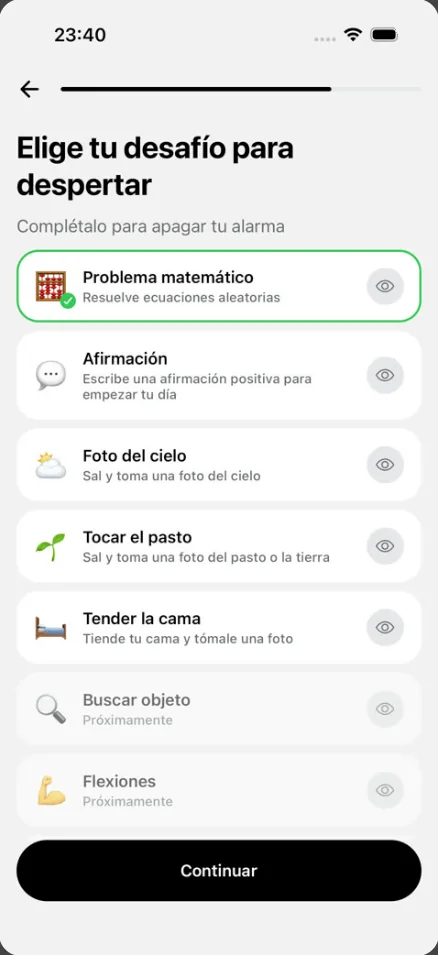
Which is better? It depends on you. Push-ups wake you up fast, but not everyone wants to exercise the moment they open their eyes, and some days your body just isn't up for it. LevoUp's missions can be done every day, and the sky photo or touching grass get you into daylight, which helps you feel awake. Push-ups, squats and a find-an-object mission are coming soon to LevoUp.
Streaks and motivation: pressure vs. consistency
Both apps use streaks so you won't want to miss a single day, but with different flavors.
Erly puts commitment front and center: it shows your current streak, your best streak and your daily wins, includes a daily accountability check-in, and locks your goals 4 hours before your wake-up time so you can't change them at the last minute. That works really well if pressure motivates you; some users, on the other hand, say the streaks stress them out.
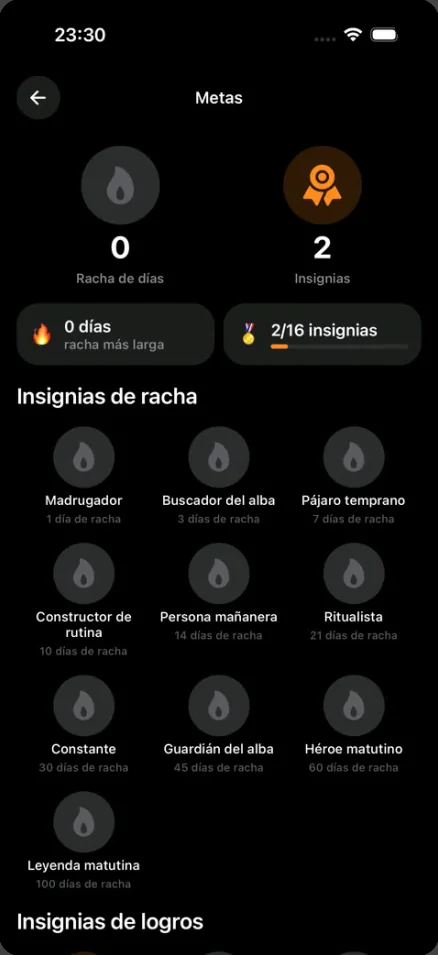
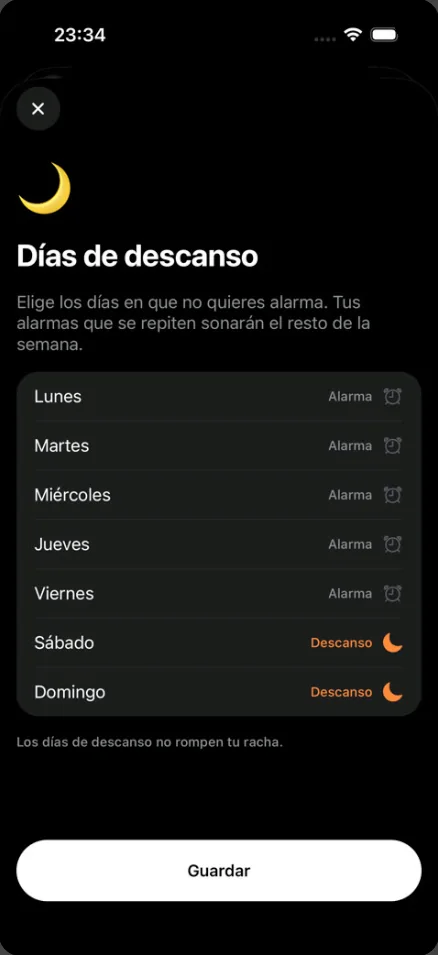
LevoUp also has a streak, badges and history, but adds rest days: you pick the days you don't want an alarm, like weekends, and they don't break your streak. You can also save “My reason” — why you want to get up early — in the app.
Price: what you pay for each
Erly is free to download, but its App Store listing says a subscription is required for full access. The US store shows in-app purchases from US$6.99 to US$39.99, without spelling out which billing period each price covers. Several reviews mention that the paywall appears after you finish the initial setup, so it's worth knowing before you spend time on it.
LevoUp doesn't have a free, ad-supported version either: everything is included in the subscription. You can try it free for 3 days with the yearly plan (about US$37 per year) or pick the weekly plan (about US$9 per week). The app reminds you before the trial ends, the exact price in your currency shows in the App Store or Google Play before you confirm, and if you cancel during the trial you aren't charged.
You'll pay for either app if you want to use it every day. Compare the yearly price in your store and look at which missions actually work for you.
Privacy and platforms
An alarm with a camera gets used in your bedroom, right after you wake up, so it's worth checking what happens to your data.
In LevoUp, the camera is only used during the mission and verification happens on your phone: we don't store, upload or share your photos.
For Erly, the privacy labels on its App Store listing (self-reported by the developer) say some data, such as identifiers and usage data, may be used to track you, and list purposes like advertising or marketing and analytics. The rest of the data it declares is listed as not linked to your identity. You can check this yourself in the “App Privacy” section before installing.
On platforms the difference is clear: Erly is an Apple-only app (iPhone with iOS 17.6 or later, plus Apple-silicon Macs and Vision Pro), and we couldn't find a version on Google Play. LevoUp works on iPhone and Android, so it's the alternative if you're on Android or want the same alarm on both.
Which one should you choose?
There's no universal winner:
- Erly is better if you're on iPhone, want exercise missions like push-ups right now, and are motivated by a strict streak system.
- LevoUp is better if you use Android or prefer an app in five languages, with routine missions (math, affirmation, sky, grass, bed), photos that stay on your phone, rest days and a 3-day free trial.
Whichever you choose, the app works best alongside good habits: one alarm set for your real wake-up time, your phone away from the bed and a regular sleep schedule. To work out when to go to bed so you wake up at the end of a sleep cycle, use the calculator:
What time should you go to bed?Find out when to go to bed or wake up based on your 90-minute sleep cycles. Open calculatorIf you're comparing more options, see our LevoUp vs. Alarmy comparison and our guide to an alarm that won't turn off until you get up. And if you want to try the alternative, you can download LevoUp and use it free for 3 days.
Frequently asked questions
What's the best Erly alternative?
It depends on why you're switching. If you use Android or prefer missions that aren't exercise, LevoUp is a good option: the alarm only turns off when you complete a mission, like solving a math problem, photographing the sky or making your bed, and it works on iPhone and Android.
Is Erly free?
Erly is free to download, but its App Store listing says a subscription is required for full access. In the US it shows in-app purchases from US$6.99 to US$39.99. Confirm the price in your country before subscribing.
Is Erly available on Android?
Its App Store listing covers iPhone, Apple-silicon Macs and Vision Pro, and we couldn't find a version on Google Play. LevoUp is available on both iPhone and Android.
Does LevoUp have a push-up mission like Erly?
Not yet. Push-ups, squats and a find-an-object mission are coming soon. Today LevoUp offers math problem, affirmation, photo of the sky, touch grass and make your bed.
Can I snooze in LevoUp or Erly?
In neither. LevoUp has no snooze button: if you ignore the alarm, it keeps ringing until you complete the mission. Erly's listing also says it doesn't allow snoozing.
Does LevoUp have a free version?
There's no free, ad-supported version, but you can try it free for 3 days with the yearly plan. If you cancel before the trial ends, you aren't charged.